


How to Enable and Configure the SCWS PHP Module in ServBay
ServBay is a powerful local web development environment designed specifically for macOS. It integrates runtimes for many languages like PHP, Node.js, Python, Go, and Java, as well as databases such as MySQL, PostgreSQL, MongoDB, and Redis. It also supports web servers like Caddy and Nginx. For developers who need to process Chinese text in PHP applications, ServBay comes pre-installed with the high-performance SCWS (Simple Chinese Word Segmentation) module, making it incredibly easy to enable.
This article provides a detailed guide on enabling the SCWS PHP extension in ServBay, configuring its dictionary files, and demonstrates basic usage with sample code.
Overview of the SCWS Module
SCWS is an open-source Chinese text segmentation engine known for its high performance and accuracy. By combining dictionary matching with statistical models, SCWS can quickly and accurately segment Chinese text, making it an excellent fit for building Chinese search engines, text mining, content analysis, keyword extraction, and part-of-speech tagging.
Key Features
- High Performance Segmentation: SCWS uses an optimized segmentation algorithm capable of efficiently processing large-scale Chinese text data.
- High Accuracy: By leveraging both dictionary and statistical models, SCWS delivers high accuracy in segmentation tasks.
- Feature-Rich: Beyond basic segmentation, SCWS also supports advanced features like keyword extraction and part-of-speech tagging.
- Easy Integration: It offers a straightforward API, making it easy for developers to integrate into PHP applications.
- Open Source & Free: SCWS is open-source and free to use and customize as needed.
Pre-installed SCWS Version in ServBay
ServBay supports multiple versions of PHP and pre-installs the corresponding SCWS module for each. At the time of writing, ServBay comes with SCWS 1.2.3 extension pre-installed for PHP 5.6 through PHP 8.4.
How to Enable the SCWS Module
By default, the SCWS module is disabled in ServBay. There are two main ways to enable it: via the ServBay graphical interface or by manually editing configuration files.
Recommended: Enable via ServBay Graphical User Interface
This is the simplest and quickest method:
- Open the ServBay main interface.
- In the left navigation bar, click Languages, then select PHP.
- In the PHP version list on the right, find the specific PHP version you want to enable SCWS for (e.g.,
PHP 8.4). - Click the Extensions button on the right of that PHP version.
- In the popup extension list, locate the
SCWSmodule. - Toggle the switch on the left of
SCWSto enable it (it usually turns green). - Click the Save button at the bottom of the window.
- ServBay will prompt you to restart the PHP package to apply changes. Click the Restart button.
Once you complete these steps, the SCWS module will be enabled for your selected PHP version.
Manual Configuration File Edit (For Advanced Users or Troubleshooting)
If you need finer control or are troubleshooting issues, you can edit the PHP configuration file directly:
Locate the Configuration File: First, find the
conf.ddirectory of the relevant PHP version. The SCWS configuration is in thescws.inifile in that directory. The typical file path looks like:/Applications/ServBay/etc/php/X.Y/conf.d/scws.iniReplace
X.Ywith your specific PHP version (e.g.,8.4).Edit the
scws.iniFile: Open thescws.inifile with a text editor. Find the following section:ini[scws] ; Uncomment the following line to enable scws ;extension = scws.so ;scws.default.charset = gbk ;scws.default.fpath = /Applications/ServBay/etc/scwsRemove the leading
;fromextension = scws.soto enable it:ini[scws] ; Uncomment the following line to enable scws extension = scws.so ;scws.default.charset = gbk ;scws.default.fpath = /Applications/ServBay/etc/scws(Optional) You may configure the default charset and dictionary path here, but generally it’s better to set these dynamically in your PHP code for more flexibility. If you choose to set these here, also remove the leading
;and modify the values as needed. For example, if your dictionary is UTF-8 encoded:ini[scws] ; Uncomment the following line to enable scws extension = scws.so scws.default.charset = utf8 scws.default.fpath = /Applications/ServBay/etc/scwsSave and close the file after editing.
Restart the PHP Package: Open the ServBay main interface, go to Packages, locate the PHP version you edited (e.g., PHP 8.4), and click the restart button (usually a circular arrow icon).
Verifying SCWS Module Is Successfully Loaded
After enabling the module, it's important to verify that it's loaded correctly. The most common method is to check the output of PHP's phpinfo():
- Under the recommended web root
/Applications/ServBay/www, create a new subdirectory for testing, such asscws-test. - In the subdirectory (
/Applications/ServBay/www/scws-test), create a file namedphpinfo.php. - Copy the following PHP code into
phpinfo.php:php<?php phpinfo(); ?> - Ensure that your ServBay web server (Caddy or Nginx, etc.) is configured and running, and can serve sites from
/Applications/ServBay/www. By default, ServBay sets up aservbay.demodomain pointing to this directory. - Visit
https://servbay.demo/scws-test/phpinfo.phpin your browser. - On the PHP info page, scroll and look for the section labeled "SCWS". If you see relevant configuration and information (like version, settings), it means the module is loaded correctly.
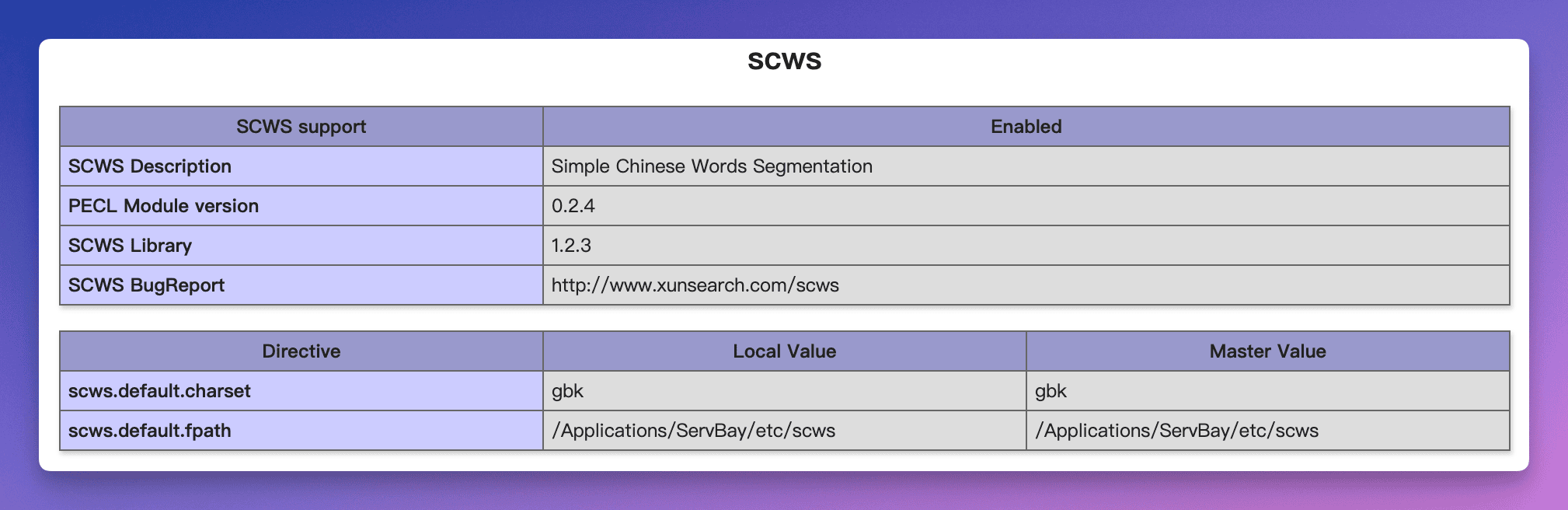 (Note: Image path for illustration only; please refer to actual ServBay documentation for current screenshots.)
Creating and Configuring SCWS Dictionaries
SCWS uses a dictionary-based segmentation engine, so its effectiveness depends in large part on the dictionary used. ServBay provides a default SCWS dictionary and rules file, usually located in /Applications/ServBay/etc/scws. You can also create or use your own custom dictionaries.
SCWS Dictionary File Format
SCWS supports plain text dictionaries as well as faster binary xdb dictionaries (recommended).
Plain text dictionary format is as follows—one entry per line, with optional frequency and part-of-speech annotation:
word1 [frequency1] [part-of-speech1]
word2 [frequency2] [part-of-speech2]
...Example:
Artificial Intelligence 1000 n
Natural Language Processing 800 n
ServBay 500 nzSave your custom vocabulary into a text file, for example my_dict.txt. Ensure the file encoding matches your intended character set (UTF-8 is recommended).
Generate xdb Dictionary Files
ServBay comes with the SCWS utility scws-gen-dict to convert text dictionaries to xdb format.
- Open the Terminal app in macOS.
- Use the
cdcommand to navigate to the ServBay bin directory, or directly specify the full path toscws-gen-dict(usually found in the ServBay bin directory):bashReplace/Applications/ServBay/bin/scws-gen-dict -i /path/to/your/my_dict.txt -o /Applications/ServBay/etc/scws/my_dict.utf8.xdb -c utf8/path/to/your/my_dict.txtwith your actual dictionary file path. The-oflag specifies where to output the xdb file (recommended:/Applications/ServBay/etc/scws). The-c utf8flag specifies the input file encoding.
Configure SCWS to Use the Dictionary
Once you have your xdb file, you can specify which dictionary to use in your PHP code:
<?php
$scws = scws_new();
$scws->set_charset('utf8'); // Set charset to match your dictionary’s encoding
// Set the main dictionary path; this can be the default or your custom xdb file
$scws->set_dict('/Applications/ServBay/etc/scws/dict.utf8.xdb');
// You can also add additional dictionaries
$scws->add_dict('/Applications/ServBay/etc/scws/my_dict.utf8.xdb', SCWS_XDICT_TXT); // SCWS_XDICT_TXT for user dictionaries
$scws->set_rule('/Applications/ServBay/etc/scws/rules.utf8.ini'); // Configure rule file for POS tagging; ServBay provides a default

// ... further segmentation operations ...
?>set_dict() sets the main dictionary (usually the large official SCWS dictionary), and add_dict() allows you to append your custom dictionaries. SCWS_XDICT_TXT is a constant indicating a user dictionary.
Example: Using SCWS
With the SCWS module enabled and the dictionary configured, you can use SCWS functions in PHP code for segmentation. Here’s a basic example:
<?php

// Ensure the SCWS extension is loaded
if (!extension_loaded('scws')) {
    die('SCWS extension is not loaded.');
}

// Initialize SCWS object
$scws = scws_new();
if (!$scws) {
    die('Failed to initialize SCWS.');
}

// Set charset (must match your text and dictionary encoding)
$scws->set_charset('utf8');

// Set dictionary file path (ServBay default path)
// set_dict() sets the main dictionary
$scws->set_dict('/Applications/ServBay/etc/scws/dict.utf8.xdb');
// add_dict() can be used for custom user dictionaries
// $scws->add_dict('/Applications/ServBay/etc/scws/my_dict.utf8.xdb', SCWS_XDICT_TXT);

// Set rules file path (ServBay default path), for POS tagging and more
$scws->set_rule('/Applications/ServBay/etc/scws/rules.utf8.ini');

// Set word segmentation mode (optional; defaults to SCWS_XDICT_XPINYIN | SCWS_XDICT_DUALITY)
// SCWS_XDICT_XPINYIN: segment x characters (non-Chinese), like emails, URLs, etc.
// SCWS_XDICT_DUALITY: dual (2-gram) segmentation
// $scws->set_ignore(true); // Whether to ignore punctuation
// $scws->set_multi(SCWS_MULTI_WORD | SCWS_MULTI_ZHONGCI); // Set multi-word segmentation levels

// The Chinese text to segment
$text = "ServBay 是一个强大的本地 Web 开发环境,支持 PHP、Node.js 和多种数据库。";

// Send text to SCWS for processing
$scws->send_text($text);

// Get segmentation results
echo "Original Text: " . $text . "\n\n";
echo "Segmentation Results:\n";

// Iterate and display all word segments
while ($result = $scws->get_result()) {
    foreach ($result as $word) {
        // $word is an associative array that includes 'word', 'idf', 'attr' (POS), etc.
        echo "Word: " . $word['word'] . " (POS: " . $word['attr'] . ")\n";
    }
}

// Release SCWS resources
$scws->close();

?>Save this code as a .php file (e.g., scws_example.php) and place it under the ServBay website directory (such as /Applications/ServBay/www/scws-test/). Visit https://servbay.demo/scws-test/scws_example.php in your browser to view the segmentation output.
Notes & Tips
- Ensure the SCWS module version you enable matches the PHP version you're using. ServBay handles compatibility for you in most cases, but be mindful when configuring manually.
- The quality of segmentation results depends heavily on the dictionary. For specialized domains, consider using or building professional domain-specific dictionaries.
- Make sure SCWS config (
scws.ini), dictionary files (.xdb), and rules files (.ini) are set with correct paths, and the PHP process has read permission for these files. - Always restart the relevant PHP package after modifying PHP configuration files for changes to take effect.
Frequently Asked Questions (FAQ)
Q: I enabled SCWS via the ServBay UI, but it doesn’t appear in phpinfo()?
A: Ensure you have restarted the correct PHP package. Sometimes there are multiple PHP versions running; you need to restart the one associated with your site. If the issue persists, try manually editing the scws.ini file and double-check the file paths and for syntax errors.
Q: How do I create and use a custom dictionary?
A: Refer to the “Creating and Configuring SCWS Dictionaries” section above. Use the scws-gen-dict tool to convert your plain text dictionary to xdb format, then load it into your PHP code using the add_dict() method.
Q: What is the SCWS rules file (rules.utf8.ini) for?
A: The rules file is mainly used for part-of-speech tagging and handling specialized segmentation rules. ServBay provides a default rules file, which should suffice for most uses.
Conclusion
ServBay provides developers with an effortless way to enable and manage the SCWS PHP Chinese text segmentation module. Whether you prefer the intuitive graphical UI or flexible manual configuration, SCWS can be seamlessly integrated into your PHP development workflow. With the SCWS tools and default dictionary pre-installed, you can quickly get started and leverage SCWS’s high efficiency and accuracy in Chinese text processing—perfect for web applications like search and content analysis. As part of ServBay’s rich software package ecosystem, SCWS integration further enhances ServBay’s completeness and utility as a local development environment.